
Rust server browser symbols and tags explained
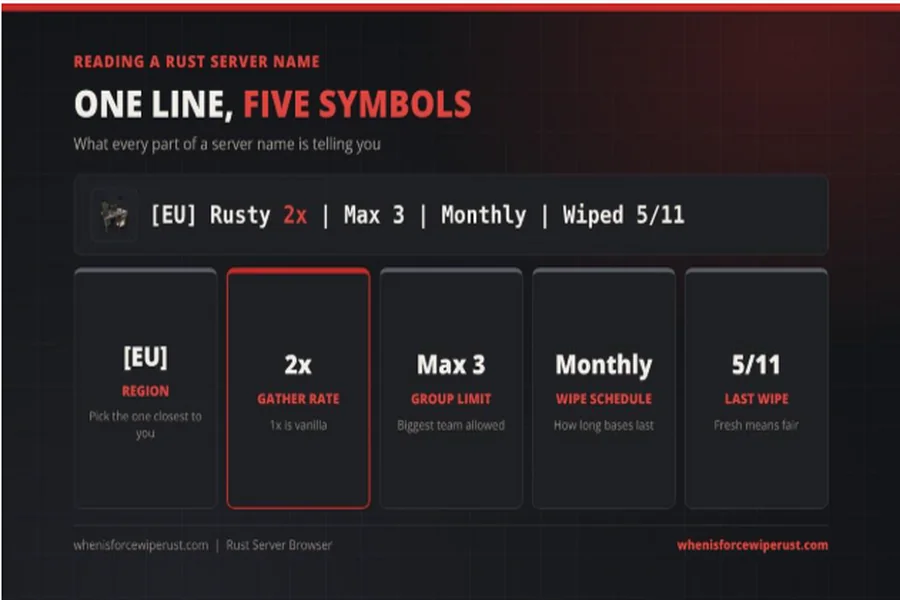
Open the server list in Rust for the first time and it looks like a page of code. Thousands of rows, each one stuffed with brackets, numbers, slashes and abbreviations: [EU] Rusty 2x | Max 3 | Monthly | BP Wipe 5/11. To a regular player, that line tells a whole story. To everyone else, it is just noise.
Server names in Rust work like a little language of symbols. Server owners only get one line of text to sell their server, so they compress everything into short tags. Once you can read them, choosing a server takes two minutes instead of two hours of joining, hating it and leaving.
This guide decodes the symbols you will see most, explains the hidden tags the game itself uses, and shows how to turn all of it into a good pick.
Why Rust Server Names Look Like This
Rust has no single official world. Facepunch Studios runs its own official servers, but most of the player base plays on community servers run by individuals and groups. Each one sets its own rules: how fast you gather resources, how many players can team up, how often the map resets.
All of that has to fit in a server name. So the community settled on shorthand that almost every server uses. Learn it once and it works everywhere.
The Most Common Symbols, Decoded
Region Tags: [NA], [EU], [AU], [SA], [ASIA]
The letters in square brackets at the start of a name are the server’s region. NA is North America, EU is Europe, AU is Australia, SA is South America. Some servers go further, such as [US East] or [UK].
Region matters because of ping, the delay between your computer and the server. Pick the region closest to you. A low ping means your shots land where you aim them.
Rate Tags: 1x, 2x, 3x, 5x, 10x
The number followed by an x is the gather rate. 1x (often written Vanilla) means the normal game: every tree, rock and barrel gives the standard amount. 2x doubles it, 5x multiplies it by five, and so on.
Higher rates make the game faster. You build a big base in an evening instead of a week. Lower rates make every resource feel valuable. Neither is better; it depends how much time you have.
Group Limit Tags: Solo, Duo, Trio, Quad, Max 3
These tell you how many players can team up. Solo means you play alone, Duo means pairs, Trio is three and Quad is four. Max 3 or Max 5 means teams up to that size. If there is no limit in the name, assume large groups (clans) are allowed.
For new or casual players, a group limit is the single most useful tag. It stops a ten-person clan from controlling the whole map.
Wipe Tags: Weekly, Biweekly, Monthly, BP Wipe
The wipe is when a server resets its map. Weekly servers reset every week, Biweekly every two weeks and Monthly once a month. Many names include the last wipe date, such as Wiped 5/11 or JW (just wiped).
BP Wipe means blueprints reset too, so everyone loses the crafting recipes they learned and starts from scratch. A map wipe without a BP wipe lets you keep your learned recipes.
Every server, whatever its own schedule, also has to reset on the monthly force wipe, the first Thursday of the month. A Rust force wipe tracker shows the exact date and time in your own time zone, which is handy when a server name only says “Force Wipe Day”.
Style Tags: PvE, PvP, Hardcore, Softcore, Modded, Vanilla
- PvP means players can fight each other. This is standard Rust.
- PvE means player damage is off or limited. You fight the environment and computer-controlled enemies instead.
- Hardcore is a tougher official mode with no map, no compass and fewer helpers.
- Softcore is a gentler official mode where you keep part of your loot when you die.
- Modded means the server runs plugins that change the rules, such as kits, teleports or bigger stack sizes.
- Vanilla means no rule changes at all.
Rust server name tags decoded
Alt text: Example Rust server name broken down into region, gather rate, group limit, wipe schedule and last wipe date.
The Hidden Symbols Behind the List
There is a second layer of symbols that most players never see. Behind the scenes, each Rust server reports a set of short tags to Steam, and the game compresses them into a caret and a single letter to save space. A few examples:
| Hidden tag | Meaning |
|---|---|
| ^m | Monthly wipe schedule |
| ^b | Biweekly wipe schedule |
| ^w | Weekly wipe schedule |
| ^v | Vanilla rules |
| ^h | Hardcore mode |
| ^s | Softcore mode |
| ^p | PvE server |
| ^z | Modded server |
The server also reports its maximum team size and the time of its last wipe. That is how a good server browser can filter by wipe schedule or “wiped in the last 24 hours” even when the server name does not say so. It is also why the name and the real settings sometimes disagree: the name is marketing, the tags are what the server actually reports.
Player Counts, Queues and What They Tell You
Next to each name you will see something like 187/200 and sometimes (25 in queue). That is current players, maximum players and the number waiting to get in.
- A long queue on wipe day is normal for popular servers. It drops after a few hours.
- A server that is nearly full all month usually has good admins and a loyal crowd.
- A server with 3 players and a big name is often new, dying or listing a fake population. Be wary.
Population changes a lot over a month. It peaks right after a wipe and drops as the weeks go on, so judge a server by its numbers right after a reset, not three weeks later.
How to Pick a Server in Two Minutes
The in-game list works, but it is slow and it is hard to filter by more than one thing at a time. A live Rust server browser on the web lets you stack filters for region, last wipe, wipe schedule, group limit and rates, then sort by players or by how recently the server wiped. Here is a simple routine:
- Filter by region. Only look at servers near you.
- Pick a group limit that matches your group. Solo or duo if you are alone or in a pair, quad if you have a few friends.
- Choose a rate. 1x for the full experience, 2x or 3x if you have limited time.
- Look at the last wipe. A server that wiped today or yesterday gives you a fair start.
- Check the population. Medium is often the sweet spot, roughly 100 to 250 players.
- Join, then commit for an evening. You cannot judge a server in five minutes.
Checklist for choosing a Rust server
Red Flags in a Server Name
Some symbols are warnings rather than information:
- Endless capital letters and emojis. Often a sign of a server chasing attention rather than players.
- “Best server” or “#1” claims. Every server says it. It means nothing.
- Huge rates with no group limit. 100x servers with unlimited teams tend to be chaos.
- Wipe dates that never change. If the “last wipe” in the name is weeks old, the owner may have stopped running it.
Reading the List Like a Regular
Rust’s server list is a language made of brackets, numbers and tiny abbreviations, and it rewards anyone who takes five minutes to learn it. Region tells you about ping, the x number tells you about pace, group tags tell you who you will meet, and wipe tags tell you how long your base will last.
Learn those four symbols, add a glance at the population, and you will find a server that fits your evenings instead of fighting one that does not.
